
Hey Poptropicans, this is a guest post by Theo’s Ghost. Enjoy!
Hello again PHB readers! Whether you’re still enjoying summer break, going back to school, or don’t have a school to go back to, I hope you’re having a great August!
This August at the Dimension Bros YouTube channel, Isaac and I are taking a short break from making videos. Fear not, because we’re returning next month, and this time we want you to join us!
Next month, for Poptropica’s birthday in September, fans are celebrating is Poptropica Month. The video above explains it all, but the gist is that during September, Poptropica fans are invited to upload their own Poptropica YouTube videos for our Pop Month 2021 playlist!
Now the point of this guest blog isn’t just to advertise the project (we already did that last year). Most people’s Pop Month videos last year were their first time uploading to YouTube, so I thought I’d give some video-making advice to the next generation of Pop Month participants. Hopefully, it might give you a bit of confidence!
Note: This event is typically for ages 13+, but you are younger than 13, you can have an older sibling or parent/guardian submit your video for you.
1. 🤔 Coming Up With Ideas
You might know everything there is to know about filming, editing, and uploading, but all of that knowledge is useless if you can’t come up with an idea for what to make! Coming up with a good video idea can be tricky, but luckily you have all the inspiration you need with the Poptropica Month 2020 playlist.
There’s a lot more possibility than a Thinknoodles-esque walkthrough — anything can be a Poptropica video! If you make digital art, you can do a speedpaint! If you have a clubhouse, you can give us a video tour! If you just like playing the game, you can make a gaming video! And if you still can’t think of a good idea, maybe try asking others for ideas. Some of our favorite Dimension Bros videos were ideas we got from other people’s suggestions, so it doesn’t hurt to ask.
2. 🎬 Recording Your Video
The most exciting part of making a video is filming it! And believe it or not, this is probably the easiest step once you have your video plan thought-out and ready to go.
The tricky part can be determining what hardware and software to use for your video, but we’ve got you covered here:
For IRL videos, just use your phone/tablet/computer camera. Most cameras built into devices are pretty good quality. You don’t need to go get a new special video camera.
For gameplay videos, OBS Studio is a great screen recording software (that can also be used for streaming). It’s completely free and there are plenty of tutorials online on getting it set up.
For videos with voiceover, a good software to use is Audacity, as it lets you really edit your audio to where you’re happiest with it. And if you have a Mac, QuickTime Player (which is already on your system) does audio recordings as well.
3. 🎥 Editing Your Video
This is the part of the process that can make or break your video. Editing is not as simple as the previous two steps, but it’s just as important. Unless you filmed your entire video in one perfect take, some editing will be required for your video.
Our officially endorsed editing software at Dimension Bros is iMovie for Apple devices. Every single DB video was edited with iMovie, and it hasn’t steered us wrong yet! If you have an iPhone, iPad, or any type of Mac computer, iMovie is completely free and might even already be installed. It’s fairly easy to learn, and it can help you make some great videos!
If you don’t have a device that can use iMovie, a bit of internet research can point you to some free video editing software.
4. ⬆️ Uploading Your Video
The home stretch! Uploading your video can be an excruciating task, as you just want it to be out in the world already!!!
As for giving your video a title and a thumbnail, that’s totally your call on what you think is best for the video. But there are a couple parts the uploading process worth noting if you’re participating in Pop Month.
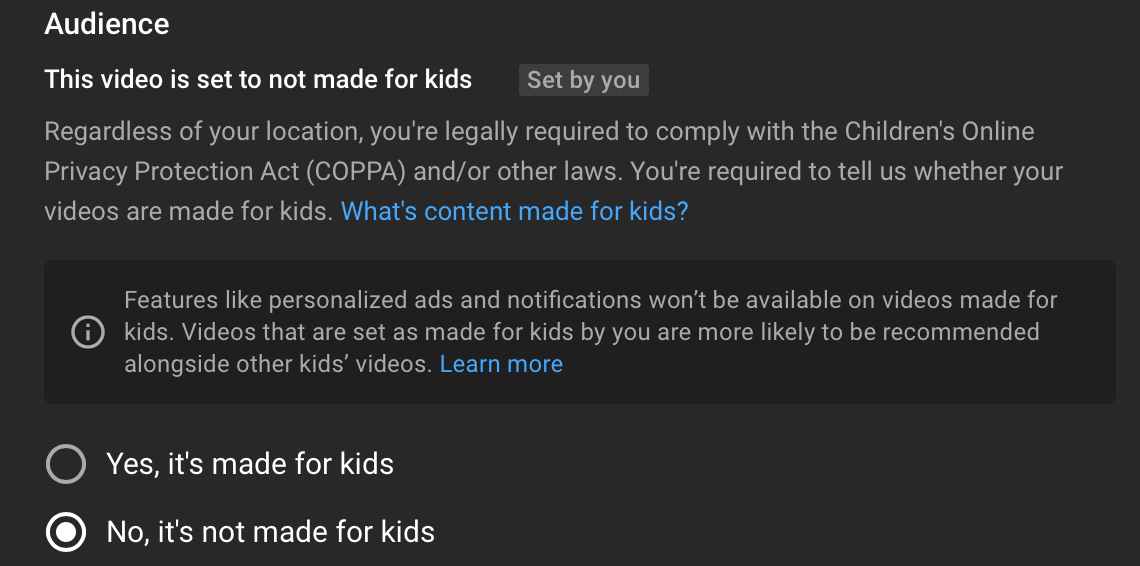
First, when uploading to YouTube, do not set your video as “made for kids,” even if your video is kid-friendly. Videos that are marked “made for kids” can’t be added to playlists, so if you want to officially be a part of the Pop Month collab, your video cannot be set as “made for kids.”
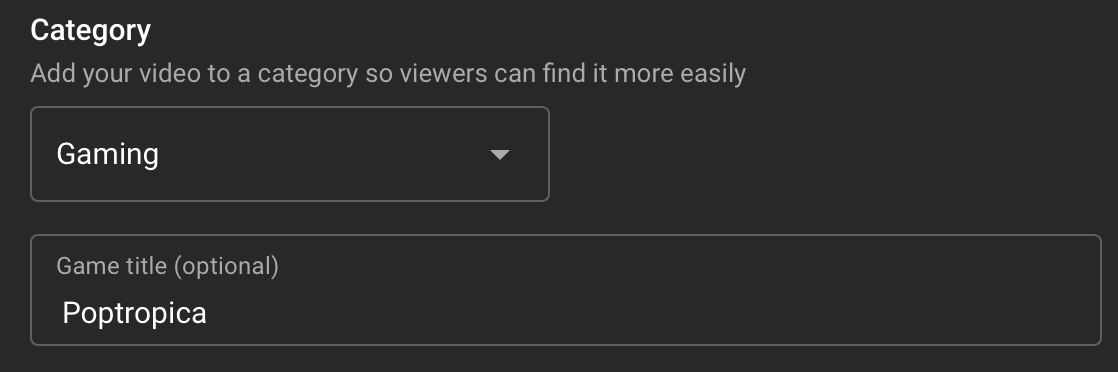
Second, don’t forget to set the category of the video as “Gaming > Poptropica”! Even if your video isn’t of you playing Poptropica, it’s still a video about the game, and using the right category helps make your video easier for other Poptropicans to find.
Other than these two things, everything else is your choice, like the title, the thumbnail image, or whether or not you allow comments. It’s your video after all!
Now if all of that seems daunting, worry not. There is another way to participate in Poptropica Month besides making a full YouTube video, and that’s Instagram! Throughout September, we’ll be compiling all your different Poptropica Instagram posts, so that at the end of the month we can make a slideshow of all your works to put on YouTube.
To join, just post something to Instagram about Poptropica this September, tag the DB Instagram account (@dimension_bros), and use #PoptropicaMonth. Simple as that! We’ll be sharing every Pop Month post to our Instagram story, and saving all of them in a highlight reel, so follow us if you want to keep track of Poptropica Month posts.
So that’s about it! Poptropica Month 2021 is less than two weeks away, and we’re looking forward to seeing what videos/posts come out this year!
We have some exciting stuff planned for Dimension Bros videos, but we’re sure some of you have exciting stuff of your own planned too. And to those not participating, enjoy all of the Poptropica content coming your way this September!
Hope you enjoyed this guest post by Theo’s Ghost. If you did, you might also enjoy another post of his: the Poppies-winning Gamer Clubhouse Tour.
The Poptropica Help Blog welcomes interesting Poptropica insights from anyone in the Poptropica community with thoughts to share. Interested in writing for the PHB? We’d love to hear from you! 📰✨
 🏝️ Poptropica Help Blog 🗺️