
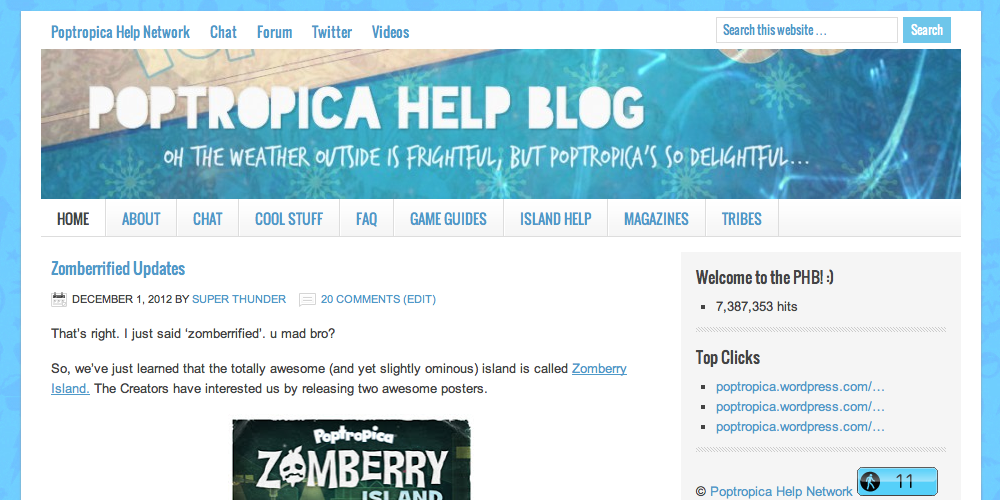
First of all, yes, this is still the same Poptropica Help Blog you’ve come to know and love. With the recent re-design of the PHN, I thought the blog could also do with a makeover that would make it more clean, easy to navigate, and eye-pleasing. Behold the new theme: Lifestyle!
And here’s the ‘before’ shot of the previous theme, Ocean Mist, in the same image dimensions:
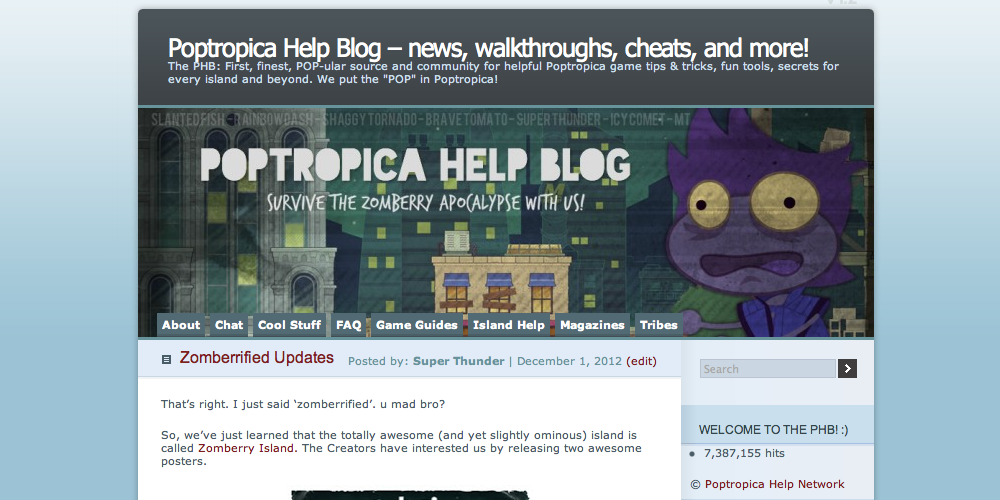
It might take some getting used to, but hopefully you’ll enjoy this new theme with its larger page navigation buttons, access to our other Poptropica Help networks at the top, wider screen, and more.
Leave some feedback to let us know what you dig and what you don’t! The new design is for the benefit of you, the reader, so we want to make sure you like it. If you’ve got suggestions, write a comment and we’ll look into it.
Also, there’s a new header up for the Christmas season, and it’s that time of the year again when “snow” falls on the blog! Plus, there’s new pages on the PHB for the Tribes of Poptropica, so go support your team! Hope you’re enjoying all the new changes! 🙂
-slanted fish

 🏝️ Poptropica Help Blog 🗺️
It might take some getting used to, but it’s looks great! First comment! 🙂
this is so cool! love the snow! awesome i cant wait to tell mah friends
also the comments are different (surprised)
i love it. its awesome
pretty neat! I believe I like it!
Well cool font.
Fishy are u ever going to change it back to Ocean Mist?
It’s possible, but there’s been lots of positive feedback for this theme, so it seems the general public prefers this one over the previous. I do personally prefer this one as well. 😛
In my opinion I like the other one better because I use it for my blog.
Well, it’s not a bad thing to have a blog that looks different. After all, it’ll stand out and be more easily recognizable. 🙂
True.
Man! This theme is expensive, it costs $79.99!
Yeah, I thought it was expensive, but it is nice. 😛 It’s $75 from the WordPress theme selection though.
How could you afford it?
how do u get the snow?
Through the theme.
In December, WordPress.com blogs have the option to enable the snow. You can turn this feature on or off in your Settings.
thank you and happy holidays fishy!!!!!!!!
oh one question if you like people to call you fishy why don’t you change your account name to it instead of slanted fish.
Happy holidays! People can call me Fishy because it’s shorter, but I like using Slanted Fish because it means something to me (I explained it a bit here).
In my opinion, not to bash the new theme. I like the other one better.
It’s ok, I might like it better when I get used to it. The snow falling is a great add! I personally think the link to the comments should be at the top and bottom of the post though.
Currently, the link to reading the comments can be found at the top of a post. I don’t have the option to put it at the bottom for the new theme, but thanks for your comment anyway! 🙂
Yeah, at first I couldn’t find it, but I’ll get use to it soon!
I also like that on the bar at the top (Where it says home, cool stuff, and tribes) you can scroll over one and a list comes down. But I do think you should have that for cool stuff too. I like the search bar too! 🙂
I like it too! However, I didn’t enable it for the Cool Stuff page because there’s some things listed on there that aren’t actual pages on the PHB, and they link elsewhere (for example, the ad transporters). I might be able to add it though, so I’ll keep it in mind. 🙂
Cool thx
I love it! 😀 How do you come up with these?
Looks neat and simple. NICE!
This theme is perfect. 😛
Oh,ST,how do you make emoticons like that? Please tell me ;(
Thanks Shaggy! 😀
Christmas Clown – We have a page called Typing Tricks that teaches you how to put emoticons in your blog comments. Hope it helps!
Thanks!BTW my ordinary name is sticky clown but I changed it for the holidays 😉
It’s beautiful! 😉 *sniff*
I think the blog looks better this way !! 🙂 😀
Fishy, Members Only Items http://samspoptropicacheatblog.wordpress.com/2012/12/04/zomberry-members-items-and-20000-hits/
The members-only items information is on our Zomberry Island page. Poptropica hasn’t released the items to the Store yet, though they should be coming pretty soon.
I love this new theme!!!!
Fishy How do I see see more comments?
To see the comments on a post from the homepage, click on the “Comments” link at the top next to the name of the post’s author. If you’re on a page, just scroll down to see all the comments, which should be on the bottom just as it used to be.
I haven’t been on in awhile, so I was pretty shocked when I came here to check out all the posts that I’ve missed and I end up finding the PHB completely changed. I really like though, now that I’ve gotten over the initial shock. Of course, the snow helps it a little bit. 😉
Wowz Fishy can I work here AND BTW the snow is only till Jan 4th D:
-JamesKiro-
Hey JamesKiro, thanks for your interest but the PHB currently isn’t looking for anyone to hire. (And when we are, we prefer to choose the authors instead of the other way around.) Yeah, the snow on WordPress blog is a feature that’s been around for a few years and it’s only available during the holiday season. 😛
Whoa, Fishy, this is amazing! Congrats on being so smartified to design the PHB like this! I love this a lot more, it’s fantastical!
im going to change my name for the holidays!
Fabulous!!!
What program do you use to create your headers. I have a blog and I want to try and make headers as nice as the ones on PHB.
Dr. Magic Onion
Poptropicatologist
I made the current header by modifying a Poptropica wallpaper and adding text with a website called Pixlr. There are a few versions you can pick from, so have fun designing! 🙂 If you want to download a program, you can try Gimp (it’s free) or Photoshop (which Codien used for past PHB headers).
Thanks! I have a few more questions, as well.
1) How do you make the super awesome transparent header on Pixlr? I tried, but it failed miserably… 😦
2) How did the PHB icon get made?
~Dr. Magic Onion
I’m not sure what you mean by transparent here, but as I said, the header was done by adding some effects to a Poptropica wallpaper plus putting on text and images. Codien created the PHB icon, probably with Photoshop.
If you have more questions about creating images, there are plenty of places you can get answers from elsewhere by searching Google. Remember, this is a Poptropica blog.